Jobs & Invoicing

Track Every Job From Quote to Invoice

Track jobs from quote to invoice. Assign technicians, log billable hours, manage line items, and generate professional PDF invoices. Built for Australian workshops.

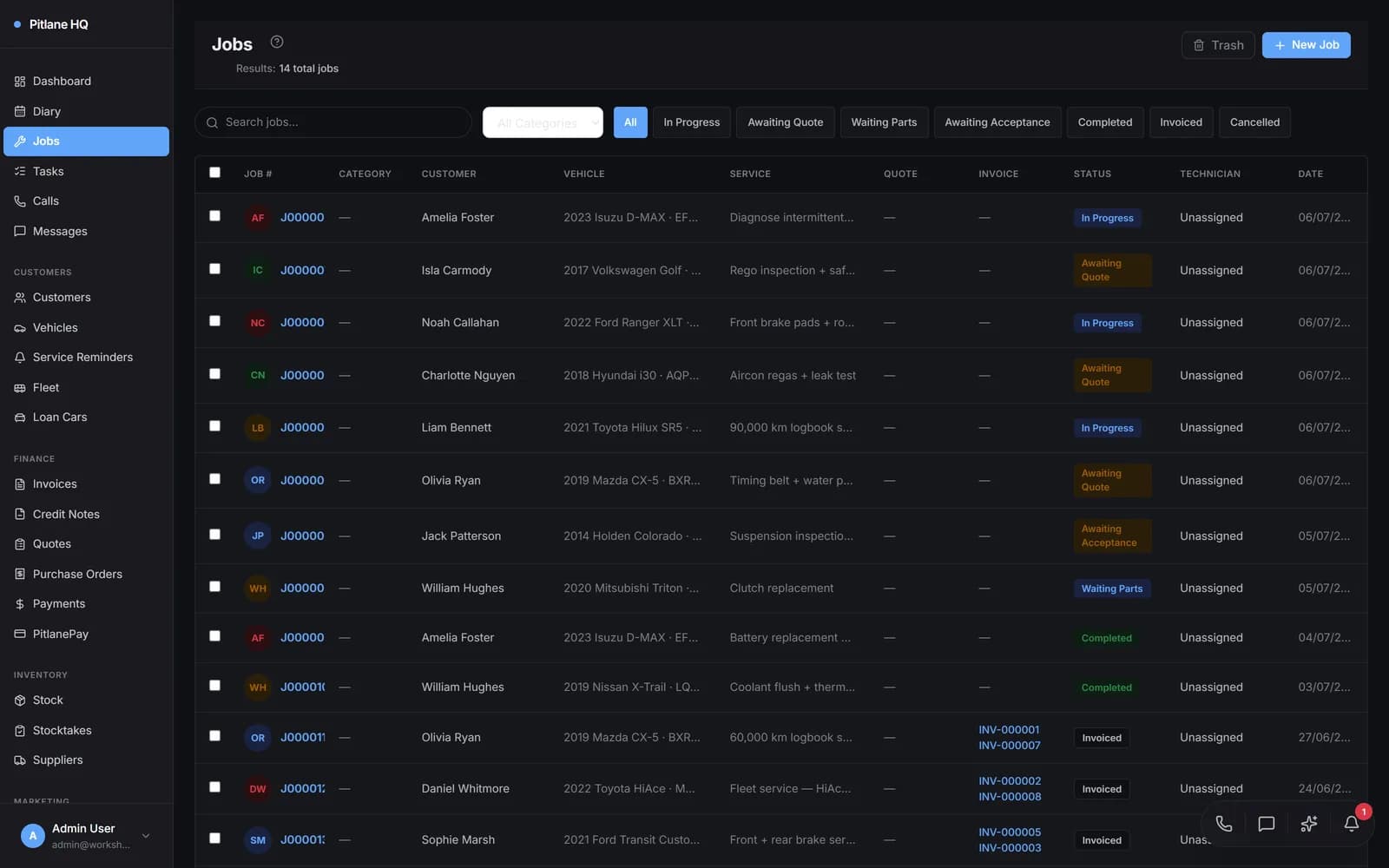
PitlaneHQ jobs list showing active workshop jobs with status, technician, and invoice columns

THE CHALLENGE

Sound Familiar?

The Problem

  • Job cards scribbled on paper get lost, stained, or thrown away before invoicing
  • Manually typing invoices takes 10-15 minutes per job and leads to missed line items
  • No visibility into which technician is working on what or how long jobs actually take
  • Payments tracked in a spreadsheet with no connection to the job or customer record

The Solution

  • Every job is digital from creation to completion with full status tracking and history
  • Invoices generate automatically from job line items — parts, labour, and totals are already there
  • Assign technicians to jobs and track billable hours with built-in start/stop timers
  • Record payments against invoices with full balance tracking and overdue notifications

FEATURES

Everything You Need

Live Status Board

See every job in your workshop at a glance — Pending, In Progress, Awaiting Parts, Complete, Invoiced. Filter by technician, date, or status.

Line Items from Stock

Add parts and labour from your inventory. Prices, descriptions, and stock levels update automatically.

Technician Assignment

Assign one or more technicians to each job. See who is working on what across your whole shop.

Billable Time Logging

Start/stop timers or enter hours manually. Billable hours feed directly into invoices and utilisation reports.

PDF Invoices

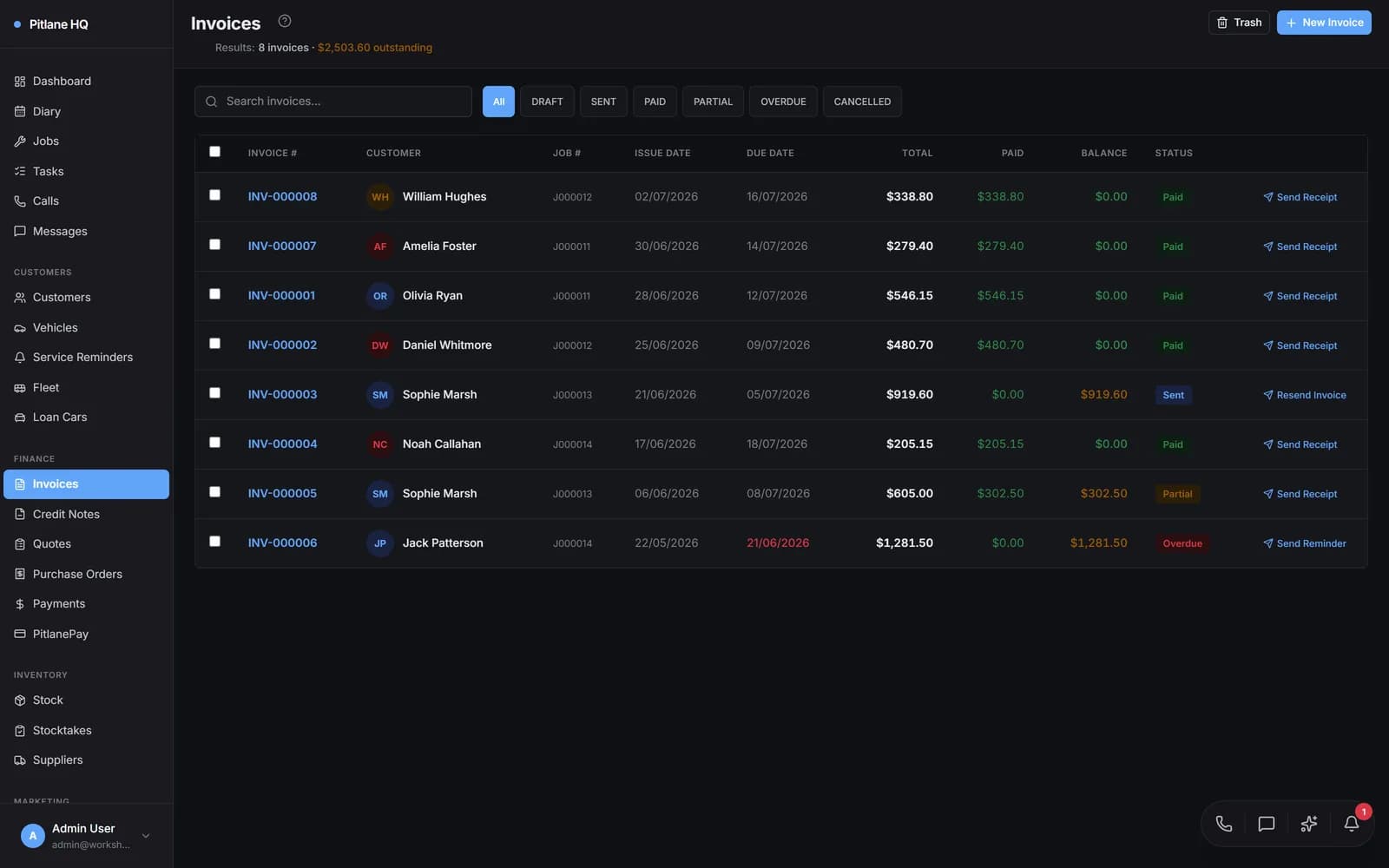
Professional PDF invoices with your logo, ABN, bank details, and branding. Ready to print or email in one click.

Email Delivery

Send invoices directly to customers via email. Track delivery status and follow up on outstanding balances.

Accounting Sync

Push invoices to Xero, MYOB, or QuickBooks. Two-way sync keeps your books balanced without double entry.

Payment Tracking

Record full or partial payments against any invoice. Track outstanding balances and overdue amounts at a glance.

HOW IT WORKS

From Start to Finish

1

Create a Job

Start from the jobs list, diary, or a converted quote. Enter the customer, vehicle, and a short service description. PitlaneHQ auto-assigns the next job number.

2

Add Line Items

Pull parts from your stock inventory and add labour lines. Prices, quantities, and GST calculate automatically. Stock levels adjust in real time.

3

Assign & Track Time

Assign one or more technicians to the job. They can start/stop timers from the job page or enter hours manually. All billable time is logged.

4

Generate Invoice

When the job is complete, the invoice is already built from your line items. Review, adjust if needed, and mark as ready to send.

5

Send & Get Paid

Email the PDF invoice to the customer or print it at the counter. Record payments as they come in — full, partial, or split across payment types.

COMPARE

Why PitlaneHQ?

FeaturePitlaneHQSpreadsheetsOther Software
Digital job tracking with status workflow
Auto-numbering with site prefixes
Professional PDF invoices with branding
One-click email delivery
Built-in billable time logging
Multi-technician assignment per job
Stock integration with auto price lookup
Partial and split payment tracking
Xero / MYOB / QuickBooks sync
File attachments on jobs (photos, PDFs)
Soft delete with trash and restore
Full audit trail of all changes

USE CASES

Real Workshop Scenarios

Independent Mechanic

Paper to Digital

The Challenge

A sole-trader mechanic was tracking jobs on paper cards and handwriting invoices. Jobs fell through the cracks and invoicing took hours every week.

The Solution

Switched to PitlaneHQ for digital job tracking and automatic invoice generation. Line items pull from stock, so invoices are built as the job progresses.

The Result

Invoicing time dropped from 4 hours per week to under 30 minutes. No more lost jobs or missed charges.

Multi-Bay Workshop

Multi-Bay Efficiency

The Challenge

A 6-bay workshop had no visibility into technician workload. Jobs were assigned verbally, time was never tracked, and utilisation was a guess.

The Solution

Each technician is assigned to jobs in PitlaneHQ and logs billable hours with the start/stop timer. The live status board shows every bay at a glance.

The Result

Technician utilisation improved by 22%. The owner can see exactly who is working on what and spot bottlenecks before they slow the shop down.

Mobile Mechanic

On-the-Go Invoicing

The Challenge

A mobile mechanic was writing quotes on-site but had to go home to create invoices on a laptop. Customers waited days for invoices.

The Solution

PitlaneHQ runs in the browser on any device. The mechanic creates jobs, adds line items, and emails invoices from a tablet at the customer site.

The Result

Invoices sent within minutes of job completion. Cash flow improved immediately with faster payment turnaround.

FAQ

Frequently Asked Questions

What Workshops Are Saying

Customer stories coming soon. We are building something workshops will love.

Ready to Streamline Your Workshop?

Join hundreds of Australian workshops already using PitlaneHQ to manage their business more efficiently.