Online Booking

See Your Whole Week at a Glance

Let customers book online 24/7. Drag-and-drop diary, colour-coded scheduling, and automatic job creation. No double-bookings.

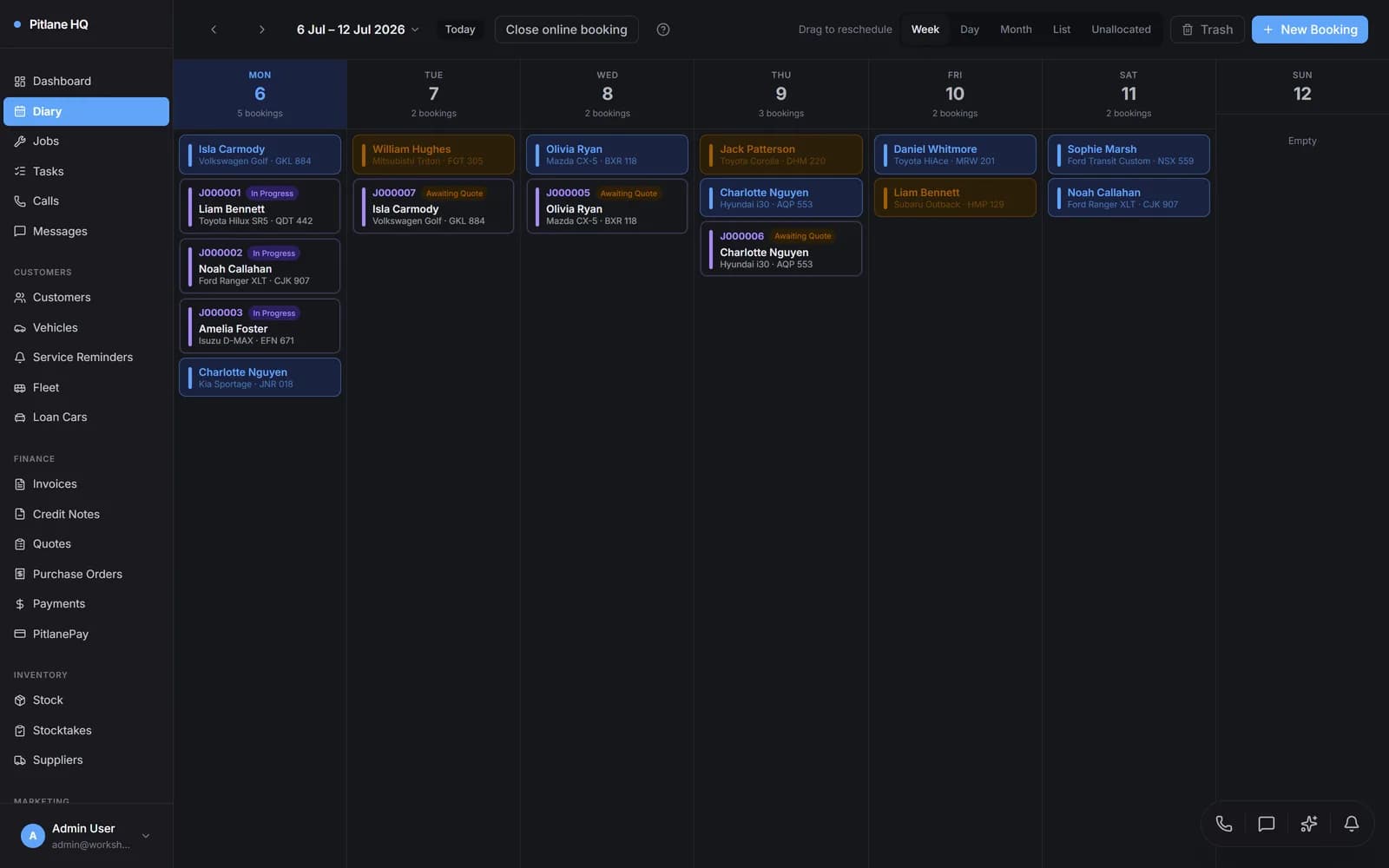
PitlaneHQ diary view showing colour-coded weekly booking schedule with drag-and-drop

THE CHALLENGE

Sound Familiar?

The Problem

  • Playing phone tag with customers wastes hours every week and interrupts technicians mid-job
  • Double-bookings happen when the diary is a whiteboard or paper calendar shared between staff
  • No-shows cost real money — a missed booking is a bay sitting empty with no revenue
  • After-hours enquiries go unanswered because nobody is there to pick up the phone

The Solution

  • Customers book online 24/7 from a branded booking page — no phone calls needed
  • A drag-and-drop digital diary prevents double-bookings with real-time availability
  • Automated SMS and email reminders reduce no-shows and keep customers informed
  • Every booking converts to a job with one click, so nothing falls through the cracks

FEATURES

Everything You Need

Visual Diary

Day, week, and month views with colour-coded booking cards. See your entire workshop schedule at a glance and spot gaps instantly.

Drag-and-Drop

Reschedule bookings by dragging them to a new time slot. No phone calls, no re-entry — just move and done.

Customer Self-Booking

A branded booking page at your own URL. Customers pick a service, choose a time, and the booking lands in your diary.

Booking Confirmations

Customers receive an automatic confirmation email and SMS the moment their booking is created.

Automated Reminders

SMS and email reminders sent before the appointment. Reduce no-shows by up to 60% without lifting a finger.

Colour-Coded Status

Each booking status has its own colour — booked, confirmed, in progress, complete. Scan the diary and know where everything stands.

One-Click Job Creation

Start a booking and PitlaneHQ creates the job, invoice, and links everything together automatically.

Multi-Site Scheduling

Manage bookings across multiple workshop locations. Each site has its own diary, availability, and opening hours.

HOW IT WORKS

From Start to Finish

1

Customer Visits Your Booking Page

Share your branded booking URL on your website, Google listing, or social media. Customers see available time slots and select a service type.

2

Selects Service and Time

The customer picks a service (logbook service, brakes, diagnostics, etc.), enters their vehicle details, and chooses a date and time that works for them.

3

Booking Confirmed Instantly

The booking appears in your diary immediately. The customer receives a confirmation email and SMS with their appointment details.

4

Reminder Sent Automatically

PitlaneHQ sends an SMS reminder before the appointment — configurable to 24 hours, same morning, or any interval you choose.

5

Customer Arrives, Job Starts

Click "Start Booking" in the diary and PitlaneHQ creates the job, generates an invoice, and links everything together. Ready to work.

COMPARE

Why PitlaneHQ?

FeaturePitlaneHQSpreadsheetsOther Software
Online customer self-booking portal
Drag-and-drop diary with day/week/month views
Automated SMS and email reminders
Colour-coded booking statuses
Quote-to-booking conversion
One-click booking-to-job creation
Calendar notes for holidays and reminders
Multi-site scheduling with per-site availability
Real-time availability (no double-bookings)
Branded booking page with your logo

USE CASES

Real Workshop Scenarios

Busy Suburban Workshop

Reclaiming the Front Desk

The Challenge

A 4-bay suburban workshop was fielding 30+ phone calls a day just for bookings. The receptionist spent more time on the phone than helping walk-in customers.

The Solution

Added the PitlaneHQ online booking link to their website and Google Business listing. Customers started booking online instead of calling.

The Result

Phone booking calls dropped by 65%. The receptionist now focuses on in-person customers and job follow-ups instead of being glued to the phone.

Regional Garage

After-Hours Bookings

The Challenge

A regional garage closed at 5pm but most customers could only call during work hours. Weekend and evening enquiries were lost to competitors.

The Solution

The 24/7 online booking page captures bookings at any time. Customers visiting the website at 9pm on a Sunday can book for the following week.

The Result

40% of bookings now come in outside business hours. The garage filled time slots that used to sit empty because customers had no way to reach them.

Performance and Tuning Shop

Specialty Time Slots

The Challenge

A performance shop needed to allocate specific time slots for dyno tuning versus general servicing. A generic calendar could not distinguish between booking types.

The Solution

Configured service types in PitlaneHQ with appropriate durations. Dyno sessions block out longer windows while standard services fit in shorter slots.

The Result

No more accidental double-booking of the dyno bay. Customers self-select the right service type and the diary fills efficiently.

FAQ

Frequently Asked Questions

What Workshops Are Saying

Customer stories coming soon. We are building something workshops will love.

Ready to Streamline Your Workshop?

Join hundreds of Australian workshops already using PitlaneHQ to manage their business more efficiently.